Quick Quote


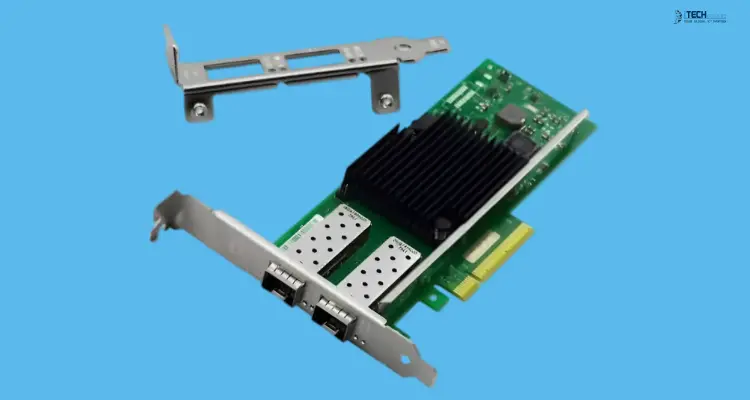


A network adapter, also called a network interface card (NIC) or Ethernet card, is the component that connects a server or workstation to your network. Most machines ship with one built in, so why would you buy another?
The usual reasons are speed, reliability, and features. An onboard 1GbE port may be too slow for a NAS full of video files. A single port leaves a server with no failover. And some hypervisors and enterprise workloads need driver support and offload features that cheap chipsets don't offer.
This guide helps you pick the right Network Adapter for your device, your bandwidth needs, and your operating system, instead of handing you a generic top-ten list. At iTech Devices, we work with IT buyers, small businesses, and homelab builders every day, and the same mistakes keep coming up: buying on speed alone, ignoring PCIe slot limits, or picking a chipset the operating system handles poorly. We'll cover how to avoid all three.
How to Choose Network Adapters for Servers and Workstations
For servers, prioritize stable drivers, PCIe connectivity, multiple ports, virtualization support, and a chipset with a proven track record. Intel, Broadcom, and NVIDIA/Mellanox dominate here.
For workstations, choose mainly by the throughput you need:
- 1GbE is enough for general office work and basic file sharing.
- 2.5GbE is a low-cost upgrade for modern desktops and NAS access.
- 10GbE or faster suits video editing, large NAS transfers, backups, databases, and virtualization.
A wired PCIe adapter is almost always the better choice over USB or Wi-Fi for production use.
Best Network Adapters
Best Network Adapters by Category
Best Budget Server NIC: Intel Ethernet Server Adapter I350-T2V2
The Intel I350 is a long-standing choice for entry-level and mid-range servers. It's a dual-port Gigabit PCIe card with virtualization offloads, power management features, and the mature driver support Intel is known for. Two ports let you set up NIC teaming for redundancy or separate management and data traffic.
It isn't fast by modern standards. But for firewalls, small business servers, domain controllers, and light hypervisor hosts, 1GbE with a reliable chipset often beats a faster card with shaky drivers.
Best NIC for Virtualization: Dell Broadcom 57810S
This dual-port 10GBASE-T adapter is built around virtualization. It supports virtual interfaces and Switch Independent Partitioning, which lets you split a physical port into several logical ones. That helps when one host runs many virtual machines with different traffic needs.
Broadcom adapters are widely used in OEM servers, which means strong support in enterprise environments. Because it uses RJ45 copper, it works with standard Cat6a cabling, so you may not need new infrastructure.
Best 25GbE Enterprise Adapter: NVIDIA Mellanox ConnectX Family
The ConnectX-4 Lx and ConnectX-6 Lx are dual-port 25GbE adapters using SFP28 connectors. They're aimed at heavier infrastructure: virtualization clusters, storage networks, and high-throughput servers.
You'll need compatible optics or DAC cables and a switch that supports 25GbE. That's a bigger investment than the other options here, so be sure your workload needs it.
Best Budget Workstation NIC: AXAGON PCEE-G25 (Realtek RTL8125B)
For a desktop that needs more than Gigabit without a big spend, this 2.5GbE card is a practical pick. It uses a PCIe 2.1 x1 slot, includes a low-profile bracket, and supports PXE boot and Wake-on-LAN.
2.5GbE runs over ordinary Cat5e or Cat6 cable, so it often needs no rewiring. If your NAS and switch support 2.5GbE, you get roughly 2.5 times Gigabit speed.
Best Basic 1GbE Adapter: TP-Link TG-3468
This is a simple PCIe x1 Gigabit card with dual brackets (full-height and low-profile) and easy installation. It suits a workstation with a failed onboard port, or an older PC that needs a reliable wired connection.
Best NIC for NAS and Video Editing
For editing from network storage, 10GbE is the target. A 10GBASE-T card is the easiest to deploy because it uses RJ45 cabling. Intel, Broadcom, and other enterprise-class 10GbE adapters are common choices, and the 57810S above fits if your workstation has a suitable slot.
Make sure your NAS, switch, and cabling can also run at 10GbE, or you'll gain nothing. A fast card connected to a Gigabit switch still runs at Gigabit.
How We Evaluate Network Adapters
We judge adapters on the factors that affect real deployments, and we weight them differently for servers and workstations.
- Driver maturity and reliability: Does the chipset have long-term, vendor-supported drivers?
- OS compatibility: Windows Server, Linux, and VMware ESXi support, ideally documented by the vendor.
- Throughput: Rated speed, and how it holds under sustained load.
- Virtualization features: Offloads, virtual interfaces, and partitioning.
- Port configuration: Single, dual, or quad port.
- Interface fit: PCIe generation, lane width, and bracket size.
- Thermals and power: Especially for 10GBASE-T and 25GbE cards.
- Price and value.
For servers, reliability and compatibility count most. For workstations, performance and value count more.
When you test adapters yourself, record the details that make results meaningful: iperf3 throughput, CPU utilization during transfers, driver and firmware versions, OS version, and the switch you used. Numbers without that context are hard to trust.
Server vs Workstation Network Adapters
The two overlap, but their priorities differ.
A workstation user mostly cares about how fast files move. A server administrator also cares about what happens when a link fails, how the card behaves under constant load, and whether a hypervisor update will break the driver.
1GbE vs 2.5GbE vs 10GbE vs 25GbE
Choose the speed based on what actually moves across the network.
1GbE tops out around 110 MB/s in real transfers. It's fine for office applications, web traffic, basic file sharing, and many small servers.
2.5GbE reaches roughly 280 MB/s. It's a sensible upgrade for modern workstations, especially with a NAS that supports it, and it usually works over existing cabling.
10GbE reaches roughly 1,100 MB/s. This is where video editing from shared storage, large backups, database traffic, and virtualization start to benefit noticeably.
25GbE is for dense virtualization, storage clusters, and heavy east-west traffic in the data center. Most single workstations will never need it.
These are approximate real-world figures. Actual performance depends on the storage behind the link, the switch, cabling, and CPU.
A useful rule: the network is only as fast as the slowest part. If your NAS uses spinning disks that deliver 200 MB/s, a 10GbE card won't make it faster than the disks.
Intel vs Broadcom vs Realtek vs Mellanox
The chipset often matters more than the brand name printed on the card.
Intel is known for mature drivers across Windows, Linux, and ESXi. It's a safe default for servers and a common choice for firewalls and routers.
Broadcom is widespread in OEM server adapters and strong in virtualization features such as partitioning and virtual interfaces.
Realtek dominates the budget end. It's well suited to workstations and home use, but generally less favored in production servers because of driver and offload differences. Many 2.5GbE cards use it.
NVIDIA/Mellanox leads in high-speed networking at 25GbE and beyond, with advanced offload capabilities for storage and virtualization.
Reputable listings should name the chipset. If a product page doesn't, ask before you buy.
PCIe vs USB Network Adapters
PCIe is the right interface for serious server and workstation use. It offers direct bandwidth to the system, better stability, and a wider range of server-grade features.
USB adapters have a place. They're useful for laptops, systems with no free expansion slots, temporary connections, and troubleshooting a dead onboard port. But they depend on the USB controller and driver quality, and many users in homelab communities report disconnects or reduced stability under sustained load. For a production server, we recommend PCIe.
PCIe slot compatibility
A PCIe card needs both a physical slot and enough bandwidth:
- x1 slots suit 1GbE and 2.5GbE cards.
- x4 or x8 slots are typical for 10GbE and 25GbE cards.
- A card can often fit in a larger slot than it needs, but not a smaller one unless the slot is open-ended.
- PCIe generation matters too. A card designed for a newer generation may run at reduced speed in an older slot, which can limit throughput on dual-port 10GbE and above.
Also check whether your chassis needs a low-profile bracket. Many compact servers and small-form-factor PCs do, and some cards ship with both sizes.
Single-Port vs Dual-Port vs Quad-Port NICs
A single port is enough for most workstations.
Dual-port cards give you redundancy and flexibility. You can team two ports for failover, or dedicate one to management and one to data. For servers, that is often worth the small extra cost.
Quad-port cards suit firewalls, routers, and virtualization hosts that need separate networks, such as production, storage, and management.
One note: a dual-port card in a single slot shares that slot's bandwidth. It does not protect you if the card itself fails. For true redundancy, use two separate adapters.
RJ45 vs SFP+ vs SFP28
RJ45 (copper) uses familiar twisted-pair cabling. It's the easiest option for workstations and for offices with existing cable runs. At 10GbE, it needs Cat6a for full-length runs and tends to use more power.
SFP+ supports 10GbE through fiber modules or direct-attach copper (DAC) cables. It runs cooler, has lower latency, and is common in server rooms. DAC cables are inexpensive for short runs between a server and a switch.
SFP28 supports 25GbE and is backward compatible with SFP+ speeds in many cases. It is the standard connector for 25GbE adapters like the Mellanox ConnectX family.
For a workstation connecting to an existing RJ45 switch, copper is simplest. For a rack of servers, SFP+ or SFP28 is usually the better long-term choice.
Network Adapter Compatibility
Don't assume that "supports Linux" means your version. Check the chain: chipset, driver, OS, and version.
Windows Server
Intel and Broadcom adapters have long-standing Windows Server drivers, and many are included in the OS or available from the vendor. Check that the driver supports your specific Windows Server release before purchase, since older cards sometimes lose support in newer versions.
Linux
Intel, Broadcom, Mellanox, and recent Realtek chipsets are supported by in-kernel drivers on current distributions such as Ubuntu, Debian, and RHEL-family systems. Older kernels may lack support for newer or budget chipsets, and some Realtek cards need a separately installed driver.
VMware ESXi
ESXi is the most restrictive. It maintains a hardware compatibility list, and many consumer adapters are not on it. Realtek 2.5GbE cards, for example, often lack native ESXi support. For ESXi, stick to Intel, Broadcom, or Mellanox adapters listed on the VMware compatibility guide, and check the listing for your exact ESXi version.
Other hypervisors
Proxmox is Linux-based and generally accommodating, but you should still confirm the chipset driver is stable on the kernel version you run.
Network Adapters for Virtualization
Virtualization hosts depend on more than raw speed. Look for:
- Hardware offloads that reduce CPU load during heavy traffic.
- Virtual interfaces and partitioning, so multiple VMs get dedicated network resources.
- Multiple ports for separating management, VM, and storage traffic.
- Verified hypervisor support for the specific host version.
Intel, Broadcom, and Mellanox adapters are generally the strongest here. A cheap adapter may work, but it can move more work onto the CPU and cause trouble with hypervisor updates.
Features That Matter in a Server NIC
- PXE boot lets servers boot from the network, useful for provisioning and imaging.
- Wake-on-LAN allows remote power-on.
- Power management reduces heat and idle power draw.
- Link aggregation and teaming support redundancy and combined bandwidth.
- Offload engines reduce CPU use.
- Firmware update support matters for long-term security and stability.
Choosing by Workload
General office workstation: 1GbE or 2.5GbE.
Video editing workstation: 2.5GbE at minimum; 10GbE if you edit directly from fast network storage.
NAS user: 2.5GbE or 10GbE, depending on what the NAS supports.
Virtualization server: Enterprise-grade adapter with mature driver and hypervisor support.
Database server: Reliable chipset, low latency, and enough throughput for replication and backup traffic.
Backup server: 10GbE or faster if you move large volumes regularly.
Homelab: Cost matters most. Used enterprise adapters are popular, but check driver support for your OS and make sure the card isn't an OEM-locked or end-of-life model.
Conclusion
Choosing a network adapter is less about finding the single best card and more about matching four things: your workload, the speed you actually need, the connector your network uses, and the operating system you run.
For quick guidance: pick an Intel I350-class card for a reliable entry-level server, a Broadcom or Intel 10GbE card for virtualization or heavy storage work, a Mellanox ConnectX for 25GbE infrastructure, and a 2.5GbE Realtek-based card for a budget workstation upgrade.
Before buying, confirm the chipset, PCIe slot width, bracket size, and OS or hypervisor support. Those four checks prevent most returns.
If you're unsure which adapter fits your setup, the iTech Devices team can help you compare options and confirm compatibility before you order.
FAQs
What is the best network adapter for a server?
It depends on your speed and workload, but Intel, Broadcom, and NVIDIA/Mellanox adapters are the usual choices. The Intel I350 suits entry-level 1GbE servers, Broadcom cards suit virtualization hosts, and Mellanox ConnectX cards suit 25GbE environments.
What is the best Ethernet card for a workstation?
For most users, a 2.5GbE card is a cost-effective upgrade. If you edit video from network storage or move very large files, 10GbE is the better fit.
Is Intel or Broadcom better for servers?
Neither is better in every case. Intel is known for broad driver support and reliability. Broadcom is strong in OEM server environments and virtualization features. Match the choice to your server vendor and OS.
Is 2.5GbE enough for a workstation?
For most office and creative work, yes. It's roughly 2.5 times faster than Gigabit and often runs on existing cabling. If you regularly move very large files, 10GbE will feel noticeably faster.
Do servers need dual-port NICs?
Not always, but dual-port cards are useful for redundancy, teaming, and traffic separation. Many production servers benefit from them.
Is 10GbE worth it for a workstation?
If your NAS, switch, and storage can deliver the speed, yes, especially for video editing, backups, and large datasets. Otherwise, you may not see the benefit.
Which NICs work best with VMware ESXi?
Intel, Broadcom, and Mellanox adapters that appear on the VMware compatibility guide for your ESXi version.
Which network cards work best with Linux?
Intel, Broadcom, Mellanox, and recent Realtek chipsets are supported in current kernels. Check your distribution and kernel version.
What PCIe slot does a 10GbE NIC need?
Typically x4 or x8, depending on the card. Check the datasheet and your motherboard's slot layout.