
 Quick Quote


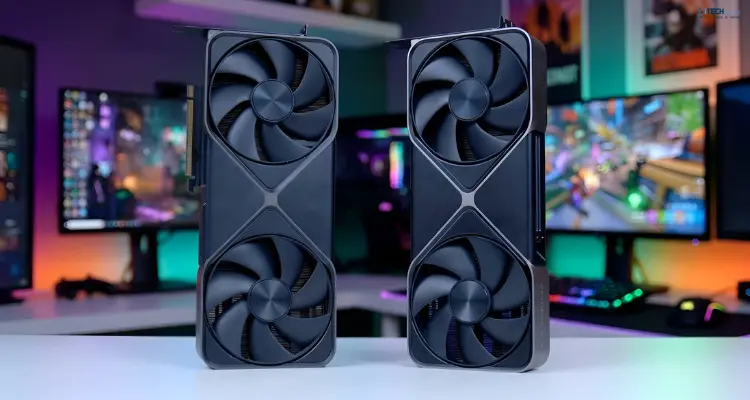


Choosing between the NVIDIA GeForce RTX 5090 and RTX 5080 isn't just about buying the fastest graphics card. It's about finding the right balance between gaming performance, VRAM, power consumption, and price.
Both GPUs belong to NVIDIA's Blackwell generation and offer GDDR7 memory, advanced ray tracing, and DLSS 4 capabilities. However, they're designed for different performance expectations and budgets.
The RTX 5090 targets enthusiasts who demand exceptional 4K gaming, demanding 3D rendering, and memory-intensive AI workloads. Meanwhile, the RTX 5080 delivers high-end gaming performance without the flagship's substantial price premium.
So, is the RTX 5090 worth the extra money, or is the RTX 5080 the smarter purchase?
In this guide from iTech Devices, we'll compare their specifications, gaming performance, AI capabilities, energy requirements, and overall value to help you make an informed decision.
RTX 5090 vs RTX 5080:
The RTX 5090 is the better GPU for maximum performance, while the RTX 5080 is the more practical choice for many high-end gamers.
The RTX 5090 offers twice the VRAM, significantly more CUDA cores, and substantially greater memory bandwidth. These advantages become especially valuable at demanding 4K settings and in professional applications.
The RTX 5080, however, offers a much lower starting price while remaining capable of excellent 1440p and 4K gaming.
Here's the simplified recommendation:
- Choose the RTX 5080 if you primarily play at 1440p, want strong 4K performance, or prioritize value.
- Choose the RTX 5090 if you want maximum 4K frame rates, extensive path tracing, or additional memory for AI and rendering.
- Consider your complete PC build before purchasing either GPU, particularly your processor, power supply, cooling, and monitor.
For most buyers, the right choice depends on how much extra performance their applications actually require.
RTX 5090 vs RTX 5080 Specifications Comparison
Before examining real-world performance, let's compare the hardware.
What Do These Differences Mean?
The RTX 5090 has approximately twice as many CUDA cores as the RTX 5080, although core counts alone don't predict a corresponding doubling in gaming performance.
Its 32 GB of GDDR7 memory is particularly important for workloads involving large datasets, detailed 3D scenes, or substantial AI models.
The RTX 5080's 16 GB of GDDR7 memory is still substantial for modern gaming. However, users handling unusually memory-intensive tasks may encounter limitations sooner.
The other major distinction is power consumption: the RTX 5090 has a 215 W higher rated total graphics power.
These differences help explain why the cards occupy different price categories.
RTX 5090 vs RTX 5080 Gaming Performance

Gaming performance is one of the biggest reasons people compare these GPUs.
Although both cards target demanding PC games, the performance gap changes depending on resolution, graphics settings, and whether ray tracing is enabled.
1440p Gaming: Is the RTX 5090 Necessary?
For most gamers playing at 2560 × 1440 resolution, the RTX 5080 is the more sensible starting point.
It's designed to deliver strong performance in demanding AAA games and competitive titles, particularly when supported upscaling technologies are enabled.
Games such as Cyberpunk 2077, Forza Horizon Forbidden West, and other demanding releases provide useful comparison scenarios.
The RTX 5090 can deliver additional frames, but the practical benefit depends on your monitor.
If you're using a 1440p 144 Hz or 165 Hz display, you may not notice a meaningful improvement in every game.
At extremely high refresh rates, the RTX 5090's extra power can become more useful. However, CPU limitations may prevent either GPU from reaching its maximum potential in some titles.
4K Gaming: Where the RTX 5090 Pulls Ahead
At 3840 × 2160 resolution, graphics cards must process considerably more pixels than at 1440p.
This is where the RTX 5090's additional processing resources become more valuable.
In its January 2025 RTX 5080 review, Gamers Nexus reported that the RTX 5090 performed approximately 30% to 68.9% better in its tested 4K gaming scenarios, depending on the title.
That range illustrates why using one universal performance percentage can be misleading.
The RTX 5090 is particularly appealing for players who want:
- High frame rates at native 4K resolution.
- Demanding graphics presets with ray tracing.
- High-refresh-rate 4K gaming monitors.
- Greater headroom for future graphical workloads.
The RTX 5080 remains a capable 4K GPU, especially when settings are optimized.
Why Benchmark Settings Matter
Not every FPS comparison measures the same thing.
Before trusting benchmark results, check the resolution, graphics preset, CPU, driver version, and whether DLSS or frame generation was enabled.
Average FPS alone can also conceal inconsistent performance.
For a complete picture, look at 1% low FPS, frame pacing, and native rendering results alongside average frame rates.
These measurements help explain how smooth a game feels rather than simply how high its FPS counter climbs.
Ray Tracing and DLSS: Which GPU Performs Better?
NVIDIA's Blackwell GPUs support advanced ray tracing and DLSS technologies designed to improve gaming visuals and performance.
Ray tracing simulates how light interacts with virtual environments, creating more realistic reflections, shadows, and illumination.
Path tracing can be even more computationally demanding.
The RTX 5090's substantially greater processing resources give it an advantage when these effects place heavy demands on the GPU.
Does DLSS Change the Buying Decision?
Both GPUs support DLSS 4 technologies, including Multi Frame Generation in compatible games.
DLSS upscaling can improve performance by reconstructing a higher-resolution image from a lower-resolution render.
Frame generation can increase displayed frame rates by producing additional frames.
However, generated FPS should not be treated as identical to native rendered FPS.
Responsiveness, image quality, underlying frame rates, and latency still matter.
The RTX 5080 can therefore be an attractive option for gamers comfortable using DLSS, while the RTX 5090 offers greater native rendering headroom.
VRAM Comparison: 16 GB vs 32 GB GDDR7
One of the most important differences between the RTX 5090 and RTX 5080 is memory capacity.
The RTX 5090 provides 32 GB of GDDR7 VRAM, compared with 16 GB on the RTX 5080.
But does twice the memory mean twice the gaming performance?
Not necessarily.
VRAM stores graphics assets such as textures, geometry, and frame buffers. Having more memory helps when a workload exceeds the capacity of a smaller card, but unused VRAM doesn't automatically increase FPS.
For many current games, 16 GB remains a capable amount of memory, including at 4K with appropriate settings.
However, extremely demanding texture configurations, heavily modified games, and professional applications can require considerably more.
When Is 32 GB VRAM Worth It?
The RTX 5090's additional memory is particularly beneficial for:
- Large 3D scenes and complex rendering projects.
- Memory-intensive AI models.
- High-resolution production assets.
- Specialized simulation and compute tasks.
For gaming alone, evaluate actual VRAM requirements before treating 32 GB as essential.
RTX 5090 vs RTX 5080 for AI and Machine Learning
The difference between these GPUs becomes especially interesting when running artificial intelligence workloads locally.
AI performance depends on several factors, including GPU compute capability, memory bandwidth, VRAM capacity, model architecture, and software optimization.
RTX 5080 for Local AI
The RTX 5080 can be useful for experimenting with local language models, AI-assisted development, image generation, and smaller inference workloads.
Quantized 7B-class models, for example, can often run within a 16 GB memory budget, depending on context length and software overhead.
However, larger models may require aggressive quantization, partial CPU offloading, or reduced context lengths.
RTX 5090 for Demanding AI Workloads
The RTX 5090 offers 32 GB VRAM and substantially greater memory bandwidth.
That makes it better suited to workloads involving larger models or higher memory requirements.
Developers working with quantized 30B-class models may benefit from the larger memory capacity, although compatibility depends on quantization format, context size, runtime overhead, and available VRAM.
Neither card should be assumed to handle every large AI model entirely in GPU memory.
Content Creation: Video Editing, Blender, and 3D Rendering
Graphics cards are also important tools for professional creators.
Applications such as Blender, DaVinci Resolve, and GPU-accelerated creative software can benefit from faster processing and additional memory.
The RTX 5090 is particularly attractive for complex scenes, large textures, GPU rendering, and demanding creative workflows.
Its 32 GB VRAM can also help when a project cannot fit comfortably within 16 GB.
The RTX 5080 remains a strong option for creators working on typical video editing, motion graphics, and moderately demanding 3D projects.
However, performance varies significantly by application.
GPU-accelerated rendering may scale differently from video editing, where CPU performance, storage speed, codecs, and software optimization also play important roles.
Before purchasing, review benchmarks for the specific software and project types you use.
Power Consumption, PSU Requirements, and Cooling
Performance isn't the only consideration when building a gaming PC.
A graphics card must also fit your system's electrical, thermal, and physical constraints.
The RTX 5090 has a rated TGP of 575 W, while the RTX 5080 is rated at 360 W.
NVIDIA's reference system recommendations are commonly listed at approximately:
- RTX 5090: 1,000 W PSU.
- RTX 5080: 850 W PSU.
These aren't universal requirements for every build. Your CPU, overclocking configuration, other components, and the GPU manufacturer's recommendations all matter.
Cooling and Physical Compatibility
High-end graphics cards generate substantial heat.
Before upgrading, check the exact card's length, thickness, airflow clearance, and power connector requirements.
Some custom RTX 5090 and RTX 5080 models use large multi-slot cooling systems.
Make sure your PC case has sufficient space and that the power cable can be installed securely without excessive bending near the connector.
For a stable system, prioritize a high-quality compatible PSU rather than judging suitability from wattage alone.
RTX 5090 vs RTX 5080 Price: Is the Upgrade Worth It?
Price-to-performance is where the RTX 5080 often becomes more attractive.
At launch, NVIDIA positioned the RTX 5080 at $999 and the RTX 5090 at $1,999.
That's a $1,000 difference before considering regional pricing, taxes, or custom graphics card models.
However, launch MSRP shouldn't be confused with current retail pricing.
Availability and local market conditions can significantly change the value comparison.
Understanding FPS per Dollar
A simple way to evaluate gaming value is to divide performance by purchase price.
For example, imagine one GPU delivers 100 FPS for $1,000, while another delivers 150 FPS for $2,000.
The more expensive GPU is 50% faster, but it delivers fewer frames per dollar.
This is only an illustrative calculation, not a measured RTX 5080-versus-5090 benchmark.
The takeaway is important: the fastest graphics card isn't automatically the best value.
When deciding, compare actual prices with independent game benchmarks using consistent settings.
For professional buyers, time saved in rendering or model processing may be more valuable than gaming FPS per dollar.
You should also factor in the cost of any required PSU or cooling upgrades.
Which GPU Is More Future-Proof?
The RTX 5090 has greater performance and memory headroom, making it a potentially longer-lasting option for demanding workloads.
However, future-proofing isn't guaranteed.
Upcoming games, graphics technologies, driver support, and application requirements are difficult to predict accurately.
The RTX 5080 may remain entirely suitable for years if your monitor, preferred games, and performance expectations don't change substantially.
Instead of purchasing solely for hypothetical future requirements, identify what you need today and how likely those requirements are to grow.
Which GPU Should You Buy? Real-World Recommendations
The right GPU depends on your priorities rather than its position in NVIDIA's product lineup.
If your current GPU already meets your needs, upgrading may not be necessary.
Monitor resolution, refresh rate, application requirements, and total PC budget should guide the final decision.
Conclusion
The RTX 5090 is the clear choice for buyers who prioritize maximum GPU performance, particularly for demanding 4K gaming, complex rendering, and memory-intensive AI applications.
Its 32 GB VRAM, additional CUDA cores, and greater memory bandwidth make it a powerful option for enthusiasts and professionals.
However, that performance comes with a substantial price and power premium.
The RTX 5080 is the smarter fit for many high-end gaming builds, offering impressive capabilities without requiring a flagship-level budget.
At iTech Devices, we recommend choosing your GPU based on your actual workload, monitor, available power, and total PC budget rather than specifications alone.
Ready to upgrade your graphics card?
Explore the graphics card options at iTech Devices, compare current product prices and warranty terms, and choose the GPU that best matches your setup.
FAQs
Which Is Better, the RTX 5080 or RTX 5090?
The RTX 5090 offers higher overall performance and twice the VRAM, making it better suited to extreme gaming and heavy computing workloads. However, the RTX 5080 is often the more economical option for gamers who don't need flagship-level performance.
Is the RTX 5090 Worth It Over the RTX 5080?
The RTX 5090 can be worth its additional cost for demanding native 4K gaming, memory-heavy rendering, or local AI workloads. For standard 1440p gaming and many 4K experiences, the RTX 5080 may offer better value.
Is 16 GB VRAM Enough for 4K Gaming?
Yes, 16 GB is sufficient for many 4K gaming scenarios, although requirements vary by game, texture quality, ray tracing settings, and modifications. Some specialized workloads can benefit from the RTX 5090's 32 GB capacity.
Which GPU Is Better for AI Performance?
The RTX 5090 is generally the stronger choice for demanding local AI workloads because it provides more VRAM, greater memory bandwidth, and substantially more processing resources. The RTX 5080 can still handle many smaller or quantized models effectively.
Is the RTX 5080 Good for 4K Gaming?
Yes. The RTX 5080 is a high-end GPU capable of demanding 4K gaming, particularly when graphics settings and DLSS are configured appropriately. The RTX 5090 provides additional headroom for maximum settings and higher native frame rates.