
 Quick Quote



Choosing a new WiFi router used to be simple — check the box, look at the price, done. Not anymore. Between Wi-Fi 6, Wi-Fi 6E, and the newer Wi-Fi 7 standard, along with mesh systems, multi-gig ports, and a dozen marketing terms that all sound impressive, it's easy to end up overpaying for features you don't need or underbuying for a home that actually needs better coverage.
At iTech Devices, we get asked almost daily which router is "the best one." The honest answer is that it depends on your home size, how many people are online at once, and what your internet plan actually supports. This guide breaks down five routers that consistently perform well across different needs — budget, home office, large homes, and whole-home mesh coverage — so you can match a router to your actual situation instead of guessing.
Quick Comparison: Best WiFi Routers for Home and Office
1. TP-Link Archer BE230 — Best Budget WiFi Router
If you want to move to Wi-Fi 7 without spending premium money, the Archer BE230 is the easiest entry point. It supports speeds up to 3.6 Gbps combined across bands, which is more than enough for most households streaming, browsing, and gaming simultaneously.
Who it's for: Renters, small apartments, or anyone replacing an aging router without wanting mesh coverage or advanced multi-gig ports.
Strengths:
- Affordable way to get Wi-Fi 7 features
- Simple setup through the TP-Link app
- Good enough performance for typical home use
2. ASUS RT-BE58U — Best WiFi Router for Most People
This is the router we recommend most often when someone asks for "just the best one" without extra qualifiers. It strikes a practical balance between price, speed, and day-to-day reliability, which is exactly what most households need.
Who it's for: Families with a mix of devices — laptops, phones, smart TVs, and smart home gadgets — who want solid performance without researching for hours.
Strengths:
- Dual-band Wi-Fi 7 performance suitable for busy households
- ASUS's router firmware is generally well regarded for stability and parental controls
- Good middle ground between the ultra-budget and high-end options on this list
3. TP-Link Archer BE400 / BE6500 — Best Mid-Range Performance
Stepping up in both price and capability, this tri-band router is built for households or small offices with heavier network demands — think multiple people on video calls, 4K streaming, and gaming happening at the same time.
Who it's for: Home offices with more than one remote worker, or households with several bandwidth-heavy devices running simultaneously.
Strengths:
- Tri-band setup spreads devices across more channels, reducing congestion
- Advertised speeds up to 6.5 Gbps combined
- Better suited to mixed-use households than dual-band options
4. ASUS RT-AX86U Pro — Best WiFi 6 Workhorse
Not everyone needs Wi-Fi 7, and this router is proof. The RT-AX86U Pro runs on the well-established Wi-Fi 6 standard and delivers AX5700-class performance that's been a favorite among gamers and power users for good reason.
Who it's for: Anyone who wants dependable, proven performance without paying a premium for a newer wireless standard their devices may not even use yet.
Strengths:
- Strong reputation for stability, especially under gaming and multi-device loads
- Gigabit and multi-gig Ethernet ports for wired connections
- Excellent value since Wi-Fi 6 hardware has matured and dropped in price
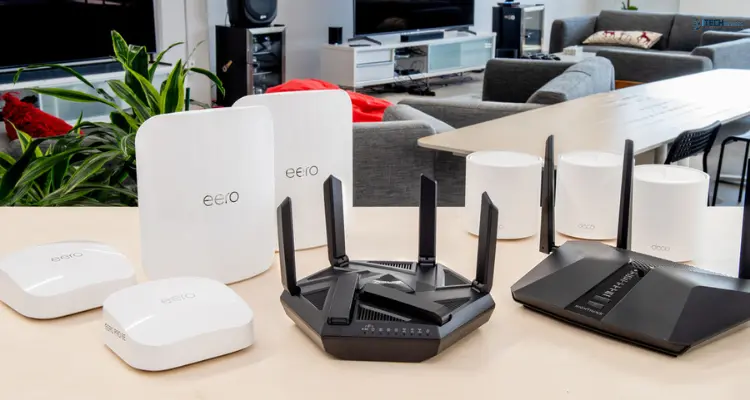
5. eero Max 7 — Best Mesh WiFi System
For large homes, multi-floor houses, or properties with awkward layouts, a single router — no matter how powerful — often can't reach every room evenly. That's where the eero Max 7 comes in. It's built specifically as a mesh system, meaning you place multiple nodes around your home to create one seamless network instead of relying on a single access point.
Who it's for: Large homes (2,500 sq ft and up), multi-story houses, or properties with thick walls that cause dead zones.
Strengths:
- Tri-band Wi-Fi 7 with multi-gig support
- Nodes hand off devices seamlessly as you move through the house, avoiding the "stuck on weak signal" problem
- Simple app-based setup and management
How We Chose the Best WiFi Routers
Rather than just listing five products, it's worth explaining what actually separates a good router from a mediocre one. These are the factors we weighed:
WiFi Standard
Wi-Fi 7 is the newest standard and brings faster theoretical speeds and a feature called Multi-Link Operation, which lets a device use multiple frequency bands at once for more consistent performance. Wi-Fi 6 and 6E remain very capable and are often more cost-effective if your devices aren't Wi-Fi 7 ready yet.
Speed and Performance
Advertised speeds (like "up to 6.5 Gbps") are combined totals across all bands — not what a single device will experience. Real-world speeds depend heavily on your internet plan, device capabilities, and interference in your home.
Coverage and Range
A router's range is affected by home size, number of floors, and wall materials. Concrete and brick reduce signal strength more than drywall. This is the single biggest reason people switch to mesh systems.
Number of Connected Devices
Modern homes often have 15–30+ connected devices between phones, laptops, smart speakers, cameras, and appliances. A feature called MU-MIMO helps routers communicate with multiple devices at once instead of one at a time, which matters more than most buyers realize.
Ethernet and Multi-Gig Ports
If you have a fast internet plan (500 Mbps or higher), your router's wired ports matter just as much as its wireless speed. Standard Gigabit Ethernet caps out at 1 Gbps; 2.5GbE ports are increasingly important for households with fiber internet plans above 1 Gbps.
Security
Look for routers with WPA3 encryption, automatic firmware updates, and a built-in guest network option to keep visitor devices separate from your main network.
Price
More expensive doesn't always mean better for your situation. A AED 500 mesh system is wasted money in a small apartment, just as a budget dual-band router will disappoint in a 3,000 sq ft house.
WiFi 6 vs WiFi 7: Which Should You Buy?
This is probably the most common question we get in-store, and the answer isn't as simple as "always buy the newest thing."
Choose Wi-Fi 7 if:
- You already own or plan to buy Wi-Fi 7-capable phones, laptops, or gaming devices
- Your internet plan is 1 Gbps or faster
- You want your router to stay relevant for the next 4–5 years
Choose Wi-Fi 6 (or 6E) if:
- Most of your current devices are 2–4 years old and don't support Wi-Fi 7
- You want strong, proven performance at a lower price
- Your internet plan is under 1 Gbps, where the standard makes less practical difference
In short: Wi-Fi 7 is the better long-term investment, but Wi-Fi 6 remains a smart, budget-friendly choice for most households today.
Single WiFi Router vs Mesh WiFi System
Another decision that trips people up is whether they need a mesh system at all.
A single router works well for apartments, small to medium homes, and single-floor layouts. It's cheaper and simpler to manage.
A mesh system becomes worth it once you're dealing with:
- Homes over roughly 2,000–2,500 sq ft
- Multiple floors
- Concrete or brick construction that blocks signal
- Persistent dead zones in specific rooms despite a decent router
If you're only experiencing weak signal in one or two rooms, a cheaper fix — like a single Wi-Fi extender — might solve the problem without the cost of a full mesh system. Mesh makes the most sense when the whole home needs even coverage, not just a single trouble spot.
What WiFi Router Do You Need for Your Internet Speed?
Your router should match — or exceed — your internet plan. A powerful router can't make a slow internet plan faster, but a weak router absolutely can bottleneck a fast plan.
If you're paying for a 1 Gbps fiber plan but using an old router with only 100 Mbps Ethernet ports, you're leaving a significant amount of speed on the table.
Best WiFi Router by Home or Office Size
- Apartment or studio: A budget dual-band router like the Archer BE230 is typically sufficient.
- Medium home (up to ~1,800 sq ft): A single strong router such as the ASUS RT-BE58U or RT-AX86U Pro should cover most layouts well.
- 2,500 sq ft home or larger: Consider a tri-band router with better range, or move to a mesh system if the layout has multiple floors.
- Large or multi-floor home: A mesh system like the eero Max 7 is the most reliable way to eliminate dead zones.
- Home office with multiple remote workers: Prioritize a router with strong simultaneous-device handling (MU-MIMO) and reliable wired Ethernet ports for stable video calls, such as the Archer BE400/BE6500.
Final Thoughts
There's no single "best" router — only the best router for your specific home, office, and internet plan. If you're unsure where to start, think about three things: your square footage, how many devices connect at once, and your actual internet speed. From there, the right pick on this list becomes a lot more obvious.
At iTech Devices, we carry all five routers featured in this guide, along with accessories like mesh extenders and Ethernet cabling to help you get the most out of whichever setup you choose. If you're still not sure which router fits your space, feel free to reach out — we're happy to help you match the right router to your home or office before you buy.
FAQs
What is the best router for home office WiFi?
For a home office, prioritize stability and simultaneous device handling over raw top speed. The TP-Link Archer BE400/BE6500 or ASUS RT-BE58U are strong choices, especially if multiple people are on video calls at once.
Which WiFi router is best for office use?
Small offices benefit most from routers with strong MU-MIMO support, solid Ethernet options, and reliable performance under multiple simultaneous connections — tri-band Wi-Fi 7 routers handle this better than basic dual-band models.
What is the best WiFi router for a large home?
For homes over roughly 2,500 sq ft, a mesh system like the eero Max 7 generally outperforms a single router, since it eliminates dead zones by design rather than relying on raw transmission power.
What router is best for a 2,500 sq ft house?
This is typically the tipping point where a mesh system starts to make more sense than a single powerful router, especially in multi-floor layouts.
Is Wi-Fi 7 worth buying for home use right now?
It's worth it if you're already buying Wi-Fi 7-capable devices or have a very fast internet plan. If most of your devices are older, a good Wi-Fi 6 router will still perform very well.
Is a mesh system better than one powerful router?
Not automatically — mesh is better for large or multi-floor homes with coverage problems. For smaller homes, a single well-placed router is often more cost-effective.
How many devices can a WiFi router handle?
Most modern routers can technically connect 30+ devices, but real-world performance depends on how many are actively using bandwidth at once — this is where MU-MIMO support matters most.