
 Quick Quote



Choosing the right external hard drive can feel more complicated than it should be. Between HDDs, SSDs, USB standards, storage capacities, and compatibility questions, it's easy to end up overwhelmed—or worse, to end up with a drive that doesn't actually suit your needs. Whether you're a business in Dubai backing up critical company files, a photographer in Abu Dhabi managing thousands of RAW images, or a student in Sharjah who just needs reliable storage for university work, this guide will walk you through everything you need to know before buying an external hard drive in the UAE.
At iTech Devices, we supply IT hardware, storage solutions, and enterprise technology to businesses and individuals across Dubai, Abu Dhabi, Sharjah, and the rest of the Emirates. This guide draws on that experience to give you a practical, no-nonsense framework for making the right choice.
External Hard Drive Buying Checklist
Before diving into the details, here's a fast checklist to keep in mind:
- Decide between HDD and SSD based on your budget and use case
- Estimate your current and future storage needs
- Match drive speed to your workload (documents vs. 4K video)
- Check your laptop's or desktop's available ports (USB-A, USB-C, Thunderbolt)
- Confirm compatibility with Windows, macOS, or gaming consoles
- Choose between a portable or desktop drive
- Review warranty length and built-in security features
- Buy only from a trusted, authorized retailer
External HDD vs External SSD: Which Should You Choose?
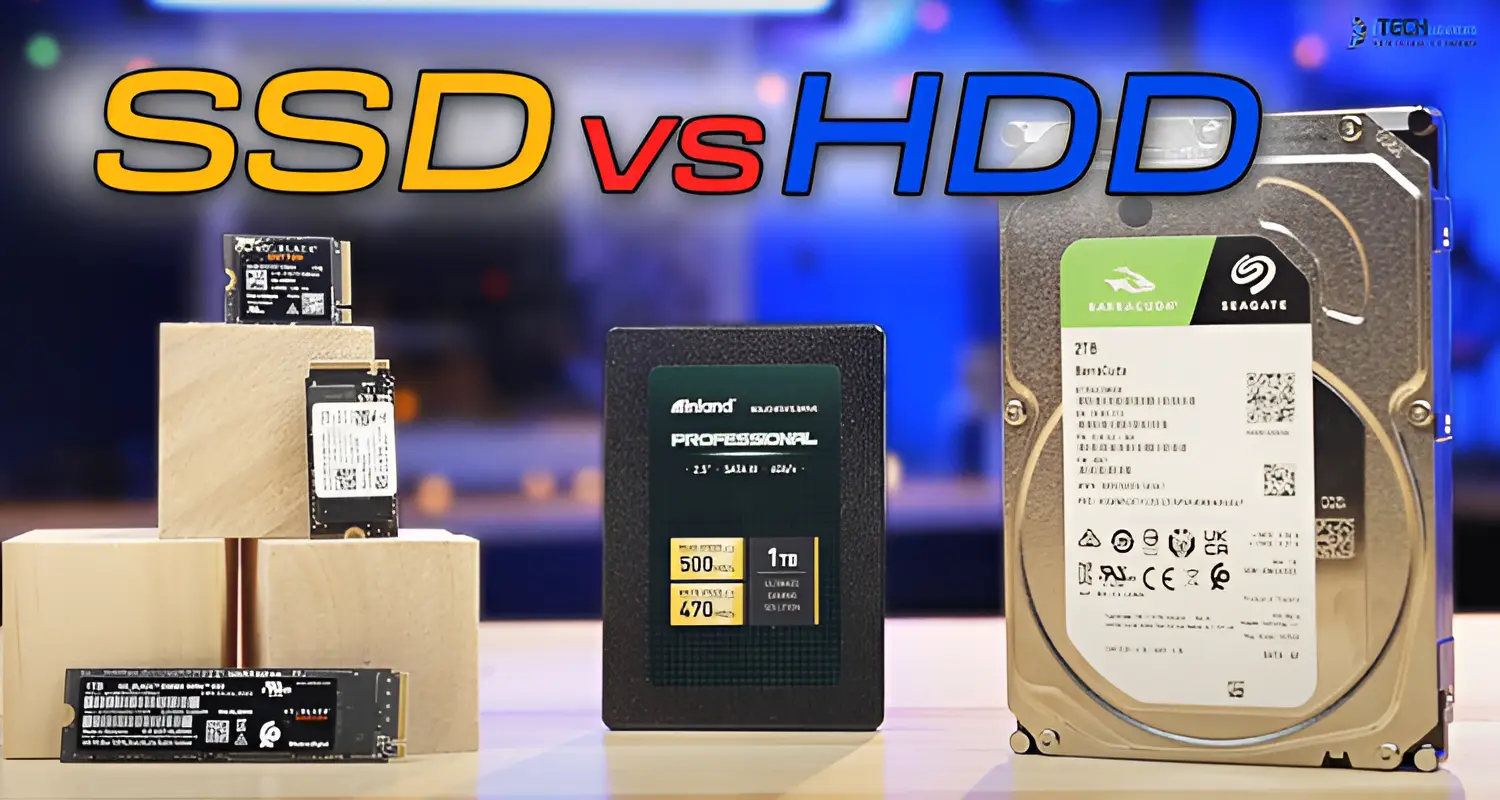
This is the single most important decision in the buying process, and it affects price, speed, durability, and long-term reliability.
External HDDs (Hard Disk Drives) use spinning magnetic platters to store data. They're mechanical, which makes them more affordable per terabyte but slightly more vulnerable to shocks and drops.
External SSDs (Solid State Drives) use flash memory with no moving parts. They're faster, quieter, more shock-resistant, and better suited for travel — but they cost more per terabyte.
How Much Storage Capacity Do You Need?
Rather than guessing, match your capacity to your actual use case.
- Is 1TB Enough? — A 1TB external drive is a reasonable starting point for documents, a modest photo library, or occasional backups. However, if you regularly work with media files or run a growing business, you may outgrow it quickly.
- Should You Buy 1TB or 2TB? — For most home users, families, and students in the UAE, 2TB offers noticeably more breathing room without a major price jump — making it the more future-proof choice.
- Who Needs 4TB or 5TB? — Photographers, videographers, and small businesses managing large client files typically need 4TB to 5TB to comfortably store growing archives without constant cleanup.
- When Should You Choose 8TB or More? — Desktop archives, full system backups, 4K/8K video libraries, and surveillance footage storage (increasingly common for UAE businesses using CCTV systems) usually call for 8TB or higher.
How Fast Should an External Drive Be?
Speed matters differently depending on what you're doing:
- Everyday file transfers: Any modern HDD or SSD will feel adequate
- Large photo libraries: An SSD noticeably speeds up browsing and exporting
- 4K/8K video files: Requires a fast SSD with a modern USB standard
- Editing directly from the drive: Only recommended with SSDs on USB 3.2 Gen 2, USB4, or Thunderbolt
- Gaming: SSDs dramatically reduce load times for supported consoles and PCs
- Full-system backups: Speed matters less than reliability and capacity here
Keep in mind: advertised interface bandwidth (measured in Gbps) is not the same as the drive's actual, real-world transfer speed (measured in MB/s). A drive's controller, the cable used, and your computer's port all affect final performance.
USB-C, USB 3.2, USB4, and Thunderbolt: Explained
This is one of the most common points of confusion for buyers.
USB-C Is a Connector, Not a Speed Standard
USB-C simply describes the shape of the port. It doesn't guarantee any particular speed — a USB-C cable could be fast or relatively slow depending on the standard behind it.
USB 3.2 Naming Explained
USB 3.2 comes in multiple sub-versions with different maximum speeds. Always check the specific generation (Gen 1, Gen 2, or Gen 2x2) rather than assuming "USB 3.2" alone tells the full story.
When USB4 Matters
USB4 offers significantly higher bandwidth and is worth prioritizing if you regularly move large video files or work with high-resolution media.
Who Needs Thunderbolt
Thunderbolt is typically relevant for professional video editors and users working with external drives as a primary working volume rather than just backup storage.
Why the Cable Can Limit Performance
Even a fast SSD will underperform if paired with a low-quality or older cable. Always use the cable supplied with the drive, or one explicitly rated for the required standard.
Portable vs Desktop External Drives
Windows, Mac, and Cross-Platform Compatibility
File system compatibility is often overlooked until it causes a problem.
If you regularly switch between Windows and macOS devices — common in mixed-office environments across the UAE — formatting your drive as exFAT is usually the safest choice.
Best External Drive by Use Case
Backups — A large-capacity HDD (2TB–4TB) offers the best value for regular full-system or business backups.
Photo Storage — A 4TB SSD or HDD provides ample room for growing photo libraries, with SSDs offering faster browsing and editing.
Video Storage and Editing — A fast SSD with USB 3.2 Gen 2, USB4, or Thunderbolt connectivity handles demanding video workflows far better than a standard HDD.
Gaming — SSDs significantly reduce load times for both PC and console gaming libraries.
Travel — Compact, shock-resistant SSDs are the safer choice for professionals frequently on the move across the region.
Long-Term Archiving — High-capacity desktop HDDs (8TB+) remain the most cost-effective option for archival storage.
Reliability, Warranty, and Data Safety
No external drive should be treated as your only backup. Mechanical and electronic components can fail regardless of brand or price point.
Follow the 3-2-1 backup principle:
- Keep 3 total copies of your data
- Store them on 2 different types of media
- Keep 1 copy off-site or in the cloud
Also consider:
- Warranty length — longer warranties often reflect stronger build confidence
- SMART health monitoring — helps detect early signs of drive failure
- Encryption and password protection — essential for sensitive business or personal data
- Safe-eject procedures — always eject drives properly to avoid data corruption
Mistakes to Avoid When Buying an External Hard Drive
- Buying based on capacity alone, ignoring speed and compatibility
- Confusing USB-C (a connector) with a guaranteed speed standard
- Purchasing an SSD faster than your computer's port can support
- Buying from unverified or unauthorized sellers
- Keeping the only copy of important files on a single drive
- Ignoring file-system compatibility between Windows and Mac
- Disconnecting the drive mid-transfer
- Filling the drive to full capacity, which can affect performance
- Underestimating future storage needs
Final Recommendations
Conclusion:
Choosing the right external hard drive comes down to understanding your storage needs, workload, and long-term backup strategy — not simply picking the largest or cheapest option available. Whether you need a dependable HDD for business archiving, a high-speed SSD for creative work, or a rugged portable drive for travel across the UAE, making an informed choice now will save you time, money, and data headaches later.
At iTech Devices, we stock a wide range of external hard drives, SSDs, and enterprise storage solutions suited to businesses and individuals throughout Dubai, Abu Dhabi, Sharjah, and beyond. Our team can help you match the right capacity, speed, and compatibility to your exact requirements — backed by genuine products, competitive pricing, and reliable after-sales support.
Ready to upgrade your storage?
Browse our full range of external hard drives and SSDs at iTech Devices today, or get in touch with our team for personalized recommendations tailored to your business or personal needs.
FAQs
What should I look for when buying an external hard drive?
Focus on six core factors: storage technology (HDD or SSD), capacity, real-world speed, connection type, compatibility with your devices, and warranty coverage.
Should I buy a 1TB or 2TB external drive?
A 1TB drive may suit documents and a modest media library, but 2TB offers considerably more room for backups and future growth at a relatively small price difference.
Is 1TB better than 256GB?
Capacity and speed are separate factors. A 256GB SSD may transfer files faster, but a 1TB drive stores roughly four times as much data—the right choice depends on your priority.
Which is better: 1TB SSD or a 1TB HDD?
It depends on your needs. SSDs offer faster speeds, better portability, and stronger durability, while HDDs are more budget-friendly at the same capacity.
How long do external hard drives last?
Lifespan varies based on usage conditions, mechanical wear (HDDs), flash memory endurance (SSDs), handling, and heat exposure. Regular backups reduce the risk of data loss regardless of drive age.
Are external SSDs more reliable than HDDs?
SSDs generally resist physical shock better since they have no moving parts, but both technologies can fail over time — reliable backup habits matter more than drive type alone.
Can I use the same external drive on Windows and Mac?
Yes, if formatted in exFAT. NTFS works fully only on Windows, while APFS is designed primarily for macOS.