
 Quick Quote

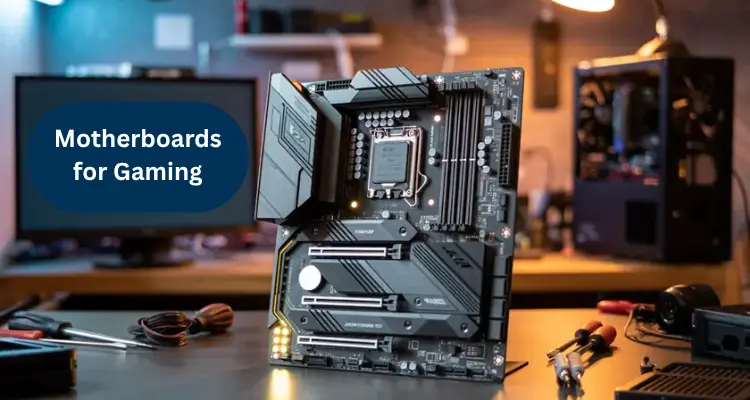


Picking a motherboard is where a lot of gaming PC builds go wrong. People obsess over the graphics card, then treat the motherboard as an afterthought — until it turns out their RAM won't run at full speed, or their case doesn't fit the board they bought, or there's no room for a second SSD.
The truth is simpler than most buying guides make it sound. Your motherboard doesn't add FPS on its own, but it decides which CPU, RAM, storage, and GPU combinations are even possible. Get it wrong, and you're stuck with a bottleneck or a return shipment. Get it right, and you've got a platform that can grow with you for years.
This guide walks through the selection process in the order that actually matters — starting with your CPU, not the motherboard's marketing name — and includes UAE pricing benchmarks from iTech Devices so you know what to expect at each tier.
What to Look for in a Gaming Motherboard
CPU Socket Compatibility
This is the first and most important check, and it's the one that causes the most buying mistakes. A motherboard is built for one specific CPU socket, not for "AMD" or "Intel" in general.
AMD's current gaming platform uses the AM5 socket, supporting Ryzen 7000, 8000, and 9000 series processors with DDR5 memory. Intel splits across two sockets: LGA1700 for 12th to 14th Gen Core CPUs, and LGA1851 for the newer Core Ultra 200 series. If you already own a CPU, this narrows your motherboard search immediately — always confirm the socket before looking at anything else.
Form Factor: ATX, Micro-ATX, or Mini-ITX?
Form factor determines whether the board physically fits your case, plus how much room you get for RAM, storage, and expansion.
ATX is the standard full-size layout, typically offering four RAM slots and the most PCIe and M.2 slots. It's the safest choice for mid-tower and full-tower cases.
Micro-ATX trims the footprint slightly while keeping most core features intact — a good balance of cost and capability.
Mini-ITX is built for small-form-factor PCs. You get fewer slots (usually two RAM slots and limited expansion), and because fitting everything into a compact board takes more engineering, Mini-ITX boards can sometimes cost more than a comparable ATX model.
Always check your case's supported motherboard sizes before shopping — it's the easiest way to avoid a board that simply won't fit.
Power Delivery (VRM) and Overclocking Support
The VRM, or voltage regulator module, controls how cleanly and consistently power reaches your CPU. This matters more than most buyers realize. A weak VRM paired with a power-hungry CPU can cause thermal throttling under sustained gaming loads, even if every other spec looks fine on paper.
If you're running a stock-clocked CPU, a mid-tier board with a solid VRM is enough. If you plan to overclock, look for boards with reinforced power delivery and more phases — usually found on X- and Z-series chipsets rather than entry-level B-series boards.
Chipset: How Does It Affect Performance?
The chipset is a controller that manages how many PCIe lanes, USB ports, and M.2 slots are available, along with whether overclocking is supported. Two boards with the same CPU socket can offer very different capabilities depending on their chipset.
On AMD AM5, chipsets range from B650 and B850 up to X870 and X870E, with each step up adding more PCIe 5.0 lanes and stronger power delivery. On Intel, B760 and B860 cover mainstream builds, while Z790 and Z890 are aimed at overclockers and high-connectivity builds.
Most gamers don't need the top chipset tier. A B-series board with a well-built VRM performs just as well for gaming as a flagship X- or Z-series board — the difference mostly shows up in overclocking headroom and extra connectivity, not frame rates.
Connectivity: Ports and Slots
Rear I/O and connectivity affect your daily experience with the PC far more than they affect gaming performance directly.
Count the USB ports before buying if you run several peripherals — keyboard, mouse, headset, controller, capture card. Running out of ports is one of the most common and easily avoidable frustrations after a build. Also check whether the board includes USB-C, which is increasingly useful for external SSDs and modern peripherals.
For networking, competitive and online gamers generally benefit from a wired 2.5Gb Ethernet connection over Wi-Fi, since it tends to offer steadier latency. If your setup is far from the router, built-in Wi-Fi 6E or Wi-Fi 7 support saves you from needing a separate adapter.
Key Features of a Gaming Motherboard
PCIe Slots and Compatibility for GPUs
Your graphics card connects through the motherboard's primary PCIe x16 slot, and nearly all modern motherboards will physically accommodate any modern GPU — this isn't usually where compatibility issues show up.
PCIe generation is the detail worth knowing. PCIe 5.0 offers more bandwidth than PCIe 4.0, but very few current GPUs actually need that much bandwidth for gaming, so it's rarely a deciding factor. It matters more for high-speed storage than for your graphics card.
RAM Compatibility and Maximum Capacity
DDR4 and DDR5 modules are not interchangeable — they use different physical notches and won't fit into the wrong slot type. Current AM5 and Intel Core Ultra boards are DDR5-only, while some older LGA1700 boards come in both DDR4 and DDR5 versions, so always confirm which one you're looking at.
Beyond the memory generation, check the number of RAM slots (four gives more upgrade flexibility than two), the maximum supported capacity, and the supported speed. DDR5-6000 is commonly cited as a strong match for AMD's memory controller. For most gaming setups, 32GB running at a well-supported speed covers current needs comfortably — chasing extreme MHz ratings rarely translates into a noticeable FPS gain.
Storage Options: SATA, M.2, and NVMe
Modern gaming motherboards connect NVMe SSDs through M.2 slots, and the number of slots varies significantly between budget and higher-tier boards.
One fast M.2 slot is enough if you're running a single drive for your OS and games. Two or more M.2 slots let you separate your OS drive from a dedicated games or media drive, or leave room to expand later. SATA ports are still useful for additional storage or older drives, so check how many a board offers if you're not going fully NVMe. PCIe Gen4 and Gen5 M.2 slots offer higher throughput, which benefits content creators and anyone running large game libraries alongside editing or streaming software more than it benefits pure gaming load times.
Choosing the Right Motherboard Based on Your Gaming Needs
Best Motherboards for High-End Gaming PCs
High-end builds pairing a flagship CPU with a top-tier GPU benefit from an X870E or Z790/Z890-class board. These offer stronger VRMs for sustained boost clocks, PCIe 5.0 support, multiple high-speed M.2 slots, and better connectivity overall — worthwhile if you're also planning to overclock or run demanding multitasking workloads alongside gaming.
Best Motherboards for Mid-Range Gaming PCs
This is where most gaming builds actually land. A B650, B850, B760, or B860 board with a solid VRM and at least two M.2 slots covers the needs of a mid-range CPU and GPU pairing without paying for overclocking headroom you won't use. This tier typically offers the best balance of features and price for anyone building a dedicated gaming PC.
Motherboards for Budget Gaming Builds
Budget builds don't need a premium chipset. Look for an entry-level B-series board with enough RAM slots for your needs, one solid M.2 slot, and stable power delivery for a stock-clocked CPU. Skip Wi-Fi, RGB, and extended overclocking support if cost is the priority — none of these affect in-game performance.
Best Motherboards for Streaming and Gaming
If you're gaming and streaming at the same time, prioritize a board with strong USB connectivity for capture cards and audio interfaces, reliable wired Ethernet, and enough M.2 slots to separate your OS, game library, and recording storage. A mid-range chipset with a capable VRM is usually sufficient — the streaming workload puts more pressure on CPU and storage than on the motherboard itself.
Motherboard Price Guide in the UAE
Motherboard prices in the UAE vary widely depending on chipset, socket, and brand. Based on current listings at iTech Devices, pricing generally breaks down into three tiers:
By brand, average pricing at iTech Devices looks like this:
For a typical gaming build pairing a mid-range or high-end GPU with a current AMD or Intel CPU, a board in the AED 700–1,300 range usually offers the best balance of features and cost. iTech Devices stocks genuine, warrantied boards across all three tiers from ASUS, MSI, Gigabyte, and ASRock, with delivery across Dubai, Abu Dhabi, Sharjah, and the wider UAE.
Motherboard Buying Guide: How to Compare Motherboards
Are All Motherboards the Same?
No — even boards built for the same CPU socket can differ significantly in VRM quality, chipset features, slot count, and connectivity. Two B650 boards from different brands, or even different product lines from the same brand, can perform quite differently under sustained load. The socket tells you what CPU fits; everything else — chipset, VRM design, slot layout — is what actually separates a good board from a mediocre one.
What Makes a Good Gaming Motherboard?
A good gaming motherboard checks these boxes: it matches your CPU's socket, has a chipset appropriate for your needs (mainstream vs. overclocking), fits your case's form factor, supports your RAM's generation and speed, offers enough M.2/SATA storage for your plans, and has the connectivity — USB, Ethernet, Wi-Fi — that matches how you actually use your PC. Beyond that, extra features like RGB lighting or premium heatsinks are cosmetic rather than performance-relevant.
How to Find Out What Motherboard I Have
Checking Your Motherboard Model in Windows
If you're upgrading an existing PC rather than building from scratch, you can check your current motherboard without opening the case. Press Windows + R, type msinfo32, and press Enter. Under System Summary, look for "BaseBoard Manufacturer" and "BaseBoard Product" — this shows your motherboard's brand and model.
How to Physically Check Your Motherboard Model
If Windows doesn't return clear details, or you're checking a board that isn't currently installed, open your case and look directly at the board. The model name is usually printed near the CPU socket, along the top edge of the board, or between the PCIe slots. A flashlight helps, since the text is often small and can be partly hidden under cables or a GPU. If you have the original box or invoice, that's the quickest way to confirm the exact model without opening the case at all.
Motherboard Size: Which One Should You Choose?
What Size Motherboard Should I Get?
If you're using a mid-tower or full-tower case, ATX is the default choice — it gives you the most RAM slots, storage options, and upgrade room without any real downside. If you're building in a smaller case or want to save some cost, Micro-ATX keeps most core functionality in a smaller footprint. Mini-ITX should only be your pick if your case genuinely requires it, since you'll be trading away RAM slots and expansion room for compactness.
Why Motherboard Size Matters for Your Gaming Build
Motherboard size affects more than whether the board physically fits. Smaller boards generally mean fewer RAM slots, fewer M.2 and PCIe slots, and tighter clearance for cooling — which can limit your options if you want to add storage, a second GPU, or a larger CPU cooler later. Choosing a size with a bit of extra room, when your case allows it, gives you more flexibility to upgrade the build over time instead of replacing the motherboard entirely.
Conclusion:
The best gaming motherboard isn't the most expensive one on the shelf — it's the one that correctly matches your CPU, fits your case, supports the RAM and storage you actually need, and doesn't charge you for overclocking headroom or connectivity you'll never use. Start with your CPU socket, confirm the form factor fits your case, then work through chipset, RAM, storage, and connectivity based on how you'll actually use the PC.
If you're building or upgrading a gaming PC in the UAE, iTech Devices carries genuine, warrantied motherboards from ASUS, MSI, Gigabyte, and ASRock across budget, mid-range, and enthusiast tiers, with fast delivery across Dubai, Abu Dhabi, Sharjah, and the rest of the UAE.
FAQs
Does a gaming motherboard make a big difference in performance?
Not directly — your CPU and GPU handle the actual gaming performance. What the motherboard controls is whether those components can run at their rated specs, including RAM speed and CPU boost clocks under load. A board with weak power delivery can cause throttling, but once a board properly supports your CPU and RAM, spending more on the motherboard alone won't raise your FPS.
Can I use a gaming motherboard for work?
Yes. A gaming motherboard works fine for office tasks, browsing, or general productivity — there's no functional downside. The reverse isn't always true, though: a basic office motherboard may lack the power delivery, PCIe slots, or connectivity a demanding gaming or content-creation setup needs.
What is the best brand of gaming motherboard?
ASUS, MSI, Gigabyte, and ASRock are all well-established brands with reliable gaming motherboard lineups. Rather than picking by brand alone, compare the specific chipset, VRM quality, and feature set of the model you're considering — reliability and feature depth vary more by product line than by brand name.