
 Quick Quote



Picking a power supply for a server isn't like grabbing one for a gaming PC. A server runs 24/7, often carries multiple drives, and in many cases can't afford to go down. Get the power supply wrong, and you're looking at throttled performance, failed drives, or a system that shuts off under load at the worst possible moment.
At iTech Devices, we get asked about this constantly — from home lab builders adding their fifth hard drive to a NAS, to small businesses setting up their first rack server. This guide walks through exactly how to choose the right PSU, step by step, whether you're building a home server, a NAS, or a production rack unit.
What is a Server Power Supply?
A server power supply unit (PSU) converts AC power from the wall into the DC voltages your server's components actually use — the CPU, motherboard, RAM, drives, and any expansion cards. It's the same basic job a desktop PSU does, but server PSUs are typically built for higher sustained loads, tighter tolerances, and — in many cases — redundancy, meaning the server can keep running even if one power supply fails.
Server PSUs also tend to follow different physical standards than consumer PSUs. Instead of a standard ATX form factor, you'll often see designs like CRPS (Common Redundant Power Supply) or proprietary vendor form factors built specifically for rackmount chassis.
How to Choose the Right Server Power Supply
Calculate what your server actually draws, add a safety margin, confirm it physically fits your chassis, check you have the right connectors, pick an efficiency rating that fits your use case, and decide if you need redundancy.
Here's the full decision framework, broken down.
1. Calculate Your Server's Power Requirements
Start by adding up what each component in your server actually draws under load. This is the single most important step — everything else builds on it.
Rough component power draw:
Add these up for your specific build. A modest home server with a mid-range CPU, 32GB of RAM, and four hard drives will typically land somewhere around 150–250W under normal load. A virtualization host with a high-core-count CPU and lots of RAM can easily double that.
If you don't want to do the math by hand, an online PC power supply calculator can give you a solid estimate — just plug in your CPU, drives, RAM, and any cards.
2. Choose the Right PSU Wattage
Once you know your estimated load, don't buy a PSU rated exactly at that number. Add headroom.
General rule: add 20–30% above your calculated load.
This headroom covers a few things:
- Startup spikes — hard drives, in particular, draw noticeably more power at spin-up than during normal operation
- Future upgrades — adding drives, RAM, or a card later shouldn't mean replacing the PSU
- Efficiency curve — PSUs run most efficiently somewhere in the 40–60% load range, not at their rated maximum
So if your server draws roughly 300W under real-world load, a 400W PSU gives you comfortable headroom without being wildly oversized.
One important myth to clear up: a 750W power supply does not use 750 watts just because it's plugged in. That number is the maximum rated output capacity, not constant consumption. Your server only pulls what it actually needs at any given moment — a 750W PSU running a 200W load draws roughly 200W (plus some conversion loss), not 750W. Buying a bigger PSU than you need doesn't waste electricity in any meaningful way, but it can slightly reduce efficiency if you're running well below the PSU's optimal load range.
3. Check PSU Form Factor and Server Compatibility
This is where a lot of people run into trouble after already buying a PSU. Server chassis often don't accept standard ATX power supplies.
Things to check before buying:
- Physical dimensions — measure your chassis's PSU bay, especially in rackmount units
- Form factor standard — common ones include ATX (for tower-style home servers), CRPS/mini-CRPS (common in 1U/2U rack servers), and proprietary vendor formats (Dell, HPE, Supermicro often use their own designs)
- Mounting and connector layout — some rackmount PSUs are hot-swappable modules that slide into a bay, not a screw-in unit
If you're building a home server in a standard tower case, a regular ATX PSU will usually work fine. If you're working with a rack chassis or repurposing an enterprise server, you'll likely need a PSU that matches that specific chassis or vendor spec — a generic ATX unit often simply won't fit or connect.
4. Check Connectors and Cabling
This step gets overlooked constantly, especially by people building storage-heavy servers or NAS units.
Count how many of each connector you actually need:
- SATA power connectors (one per drive, though splitters exist)
- PCIe power connectors (for GPUs or accelerator cards)
- CPU/EPS connectors (some server motherboards need two)
- Molex connectors (for older peripherals or fans)
If you're building a storage server with 8, 10, or more hard drives, this matters a lot. Many consumer PSUs only ship with 4–6 SATA connectors. You'll either need a PSU with more native SATA connections or use splitter cables — but splitters add another point of failure and can strain a single cable if you're not careful about balancing the load.
A modular PSU is worth considering for drive-heavy builds. You only connect the cables you need, which keeps airflow cleaner inside the case — useful in a chassis already packed with drives.
Understanding 80 PLUS Efficiency Ratings
The 80 PLUS certification tells you how efficiently a PSU converts AC power to DC power. A more efficient PSU wastes less energy as heat, which matters for three reasons: lower electricity bills, less heat your cooling has to deal with, and — for always-on servers — a meaningful cumulative cost difference over a year of 24/7 operation.
For a server that's on around the clock, the jump from Bronze to Gold is usually worth the price difference over time. Going from Gold to Platinum or Titanium has diminishing returns unless you're running a fairly high, sustained load or electricity costs are a real concern in your setup.
Don't chase certification tier for its own sake. A Titanium-rated 850W PSU running a 100W idle home server isn't operating anywhere near its efficiency sweet spot — you'd likely get better real-world efficiency from a smaller, well-matched Gold unit.
Do You Need Redundant Power Supplies?
Redundancy means running two power supplies where either one can power the full system alone. If one fails, the other takes over instantly, and the server keeps running — often without anyone noticing until the failed unit gets swapped out.
This is standard in enterprise environments, but it's overkill for a lot of home setups.
The honest guidance here: if downtime costs you money, customers, or data integrity, get redundant PSUs. If a few hours of downtime while you swap a part is annoying but not damaging, a single well-chosen PSU is fine.
Check PSU Protection and Reliability Features
Beyond wattage and efficiency, look for these protection features, especially on a server that'll run unattended for long stretches:
- Overload protection (OPP) — shuts the PSU down before it's damaged by drawing more than it can safely supply
- Short-circuit protection (SCP) — cuts power instantly if a short is detected, protecting the rest of the system
- Over-voltage protection (OVP) — prevents voltage spikes from reaching sensitive components
- Under-voltage protection (UVP) — protects against unstable low-voltage conditions
Reputable server PSU manufacturers list these explicitly in their spec sheets. If a budget unit doesn't mention any of them, that's a red flag for anything you plan to leave running unattended.
Choosing a PSU for a Home Server or NAS
Home servers and NAS builds have their own priorities that don't always match enterprise advice.
Idle efficiency matters more than peak wattage. A home server or NAS often sits mostly idle — serving the occasional file, running light background tasks — rather than under constant heavy load. A PSU that's efficient at low loads (say, 10–20% of its rated capacity) will save more real-world electricity over a year than one that's only efficient at 50%+ load, since that's where your server actually spends most of its time.
Noise is a real factor. Home servers often live in a living space, not a server room. A quieter PSU with a larger, slower fan (or a fanless design at lower wattages) can matter as much as the spec sheet.
Plan for drive expansion. This comes up a lot in home lab and NAS communities — someone starts with 4 drives and ends up needing 8 or 10 within a year or two. If you're running a storage server with 7+ hard drives, or planning to grow into that range, pay close attention to:
- Total available SATA power connectors
- Startup power draw when all drives spin up simultaneously (this is often higher than steady-state running power)
- Headroom for additional drives without needing a replacement PSU
A common real-world example: a 550W 80+ Gold PSU comfortably runs a home server with 6–7 hard drives plus a modest CPU and RAM setup, with reasonable headroom for a couple more drives later. Once you're pushing toward 10+ drives, it's worth stepping up in both wattage and connector count from the start, rather than relying on splitter cables for everything.
Choosing a PSU for a Rack Server or Data Center
Rack and data center environments shift the priorities toward compatibility and reliability over raw cost savings.
- Form factor is non-negotiable. Rack PSUs, especially in 1U and 2U chassis, use compact, standardized (or vendor-specific) form factors like CRPS. You generally can't substitute a standard ATX unit here.
- Redundancy is close to standard practice. Most production rack servers ship with dual hot-swappable PSUs, letting you replace a failed unit without powering down.
- Higher-capacity units are common. Servers with multiple CPUs, several GPUs, or dense storage arrays can require power supplies rated at 1000W, 1500W, or even 3000W+ per unit, sometimes with multiple units per chassis.
- Input voltage and connection type matter. Data centers often run higher-voltage AC circuits (208V/240V) rather than standard 120V outlets — confirm your PSU and your facility's power infrastructure actually match.
Server PSU vs UPS: What's the Difference?
These two get confused often enough that it's worth a clear answer.
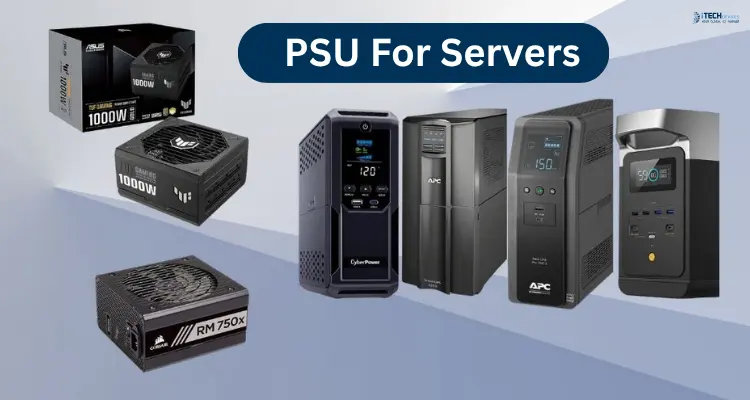
A PSU (power supply unit) is inside the server. It converts incoming AC power into the DC voltages your components use. It has no battery and provides no backup — if the wall power cuts out, the PSU stops delivering power immediately.
A UPS (uninterruptible power supply) sits between the wall outlet and your server. It contains a battery, so if utility power fails, the UPS keeps your server running for a period of time — long enough to save work, shut down cleanly, or ride out a brief outage.
You need both for a properly protected setup: the PSU converts and delivers power to your hardware, while the UPS protects against outages, brownouts, and voltage fluctuations from the utility line itself. A redundant PSU protects you from an internal hardware failure; a UPS protects you from an external power event. They solve different problems.
Final Thoughts
Choosing the right server PSU comes down to matching five things to your actual setup: calculated power draw, physical compatibility, connector count, efficiency rating, and redundancy needs. Skip any one of these and you risk either an underpowered system that struggles under load, or an oversized, mismatched unit that doesn't fit your chassis or your budget.
If you're still weighing options for your specific build — home server, NAS, or rack setup — the iTech Devices team can help you match a PSU to your actual hardware list rather than guessing at a wattage number.
FAQs
How do I calculate the power supply size for a server?
Add up the estimated wattage of every component — CPU, RAM, drives, expansion cards, motherboard, and fans — then add 20–30% headroom on top of that total. Online power supply calculators can speed this up if you'd rather not do it manually.
Is 80 PLUS Gold or Platinum better for a server?
Platinum is more efficient than Gold, but the practical difference is small unless your server runs a heavy, sustained load or you're especially cost-sensitive on electricity. Gold is a solid default for most home and small business servers running 24/7.
Do servers run on AC or DC power?
Both. Servers take AC power from the wall or rack power distribution unit, and the PSU converts that into the various DC voltages (typically 12V, 5V, and 3.3V) that internal components actually use.
What PSU do I need for a home server?
For most home servers with modest hardware and a handful of drives, a 400–550W 80+ Gold PSU with good idle efficiency is typically enough. Size up based on your specific component list and drive count.
What is the difference between a server PSU and a desktop PSU?
Server PSUs are generally built for higher sustained loads, tighter voltage tolerances, and — in enterprise contexts — hot-swappable redundancy. They also frequently use different physical form factors than standard desktop ATX units.