Quick Quote


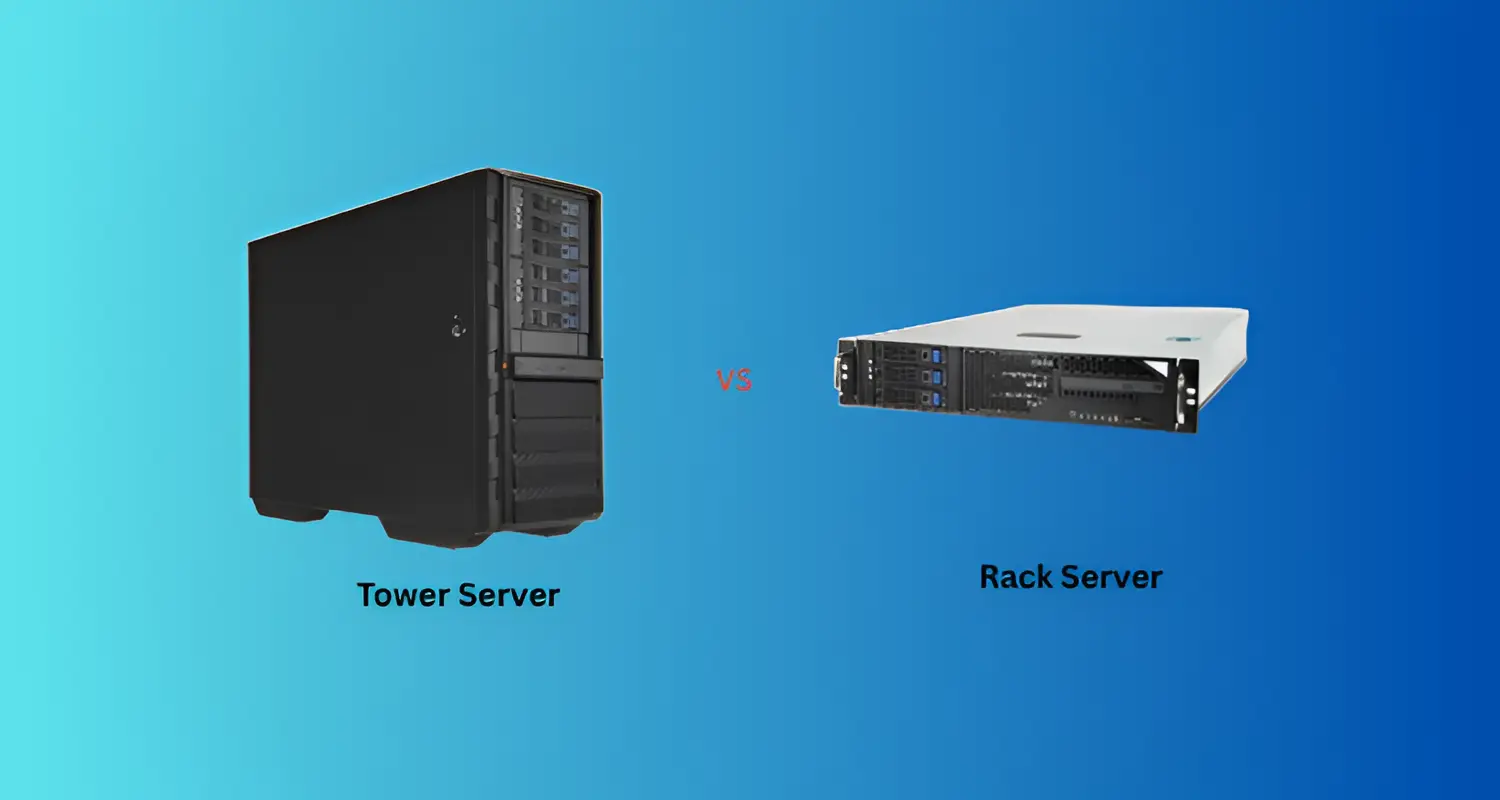


Choosing between a tower server and a rack server looks like a hardware decision, but it is really a decision about how your business works today and how it will grow over the next five years.
Tower servers are generally better for UAE small businesses that need one or a few servers, have no dedicated server room, and want simple, low-cost deployment. Rack servers are generally better for growing businesses that need multiple servers, virtualization, centralized management and higher density in the space they have.
The rest of this guide explains how to decide for your own situation, what each option really costs, and when it makes sense to move from one to the other.
Tower Server vs. Rack Server: Quick Comparison
What is a Tower Server?
A tower server is a standalone server in an upright cabinet that looks much like a desktop computer, only built for continuous operation. It has server-grade components: ECC memory, redundant power supply options, hot-swappable drives and remote management features.
How Tower Servers Work
A tower server sits on the floor or a shelf and connects to your network switch, a power outlet and (optionally) a UPS. There is nothing to mount. Larger tower models have extra internal drive bays and expansion slots, which is how a single tower can handle storage-heavy tasks without additional hardware.
Advantages of Tower Servers
- Lower upfront infrastructure cost. You are buying the server, not a server, a cabinet, rails and power distribution.
- Easy deployment. A small business with a general IT person can usually set one up without specialist installation.
- Office-friendly. Fans in tower chassis are typically larger and spin slower, so they tend to be quieter than dense rack units.
- Simple cooling. One server in a ventilated, air-conditioned room rarely needs dedicated cooling design.
- Internal expandability. Many models offer extra drive bays and PCIe slots for growth within a single box.
Disadvantages of Tower Servers
- Poor space efficiency at scale. Four towers on a shelf take far more room than four rack units in a cabinet.
- Messier cabling when several towers are deployed together.
- Harder centralized management across multiple physical boxes, unless you invest in remote management tools.
- Limited growth path. Once you outgrow one tower, adding more usually means more floor space and more cables.
Which UAE Businesses Should Use a Tower Server?
Tower servers fit businesses with modest, stable workloads: a trading company running accounting software, a clinic with a patient management system, a retail branch running a local POS backend, or a startup hosting file shares and one internal application. They also suit remote or branch offices where no IT staff are on site and a standalone box is easiest to maintain.
What is a Rack Server?
A rack server is a flat, horizontal server built to a standard width so it slides into a 19-inch server rack. Height is measured in rack units (U); 1U is 1.75 inches. Common sizes are 1U and 2U.
How Rack Servers Work
Rack servers are mounted on rails inside a cabinet alongside network switches, patch panels, storage arrays and power distribution units (PDUs). Cables are routed vertically along the rack, and cooling is usually front-to-back airflow. This standardization is the point: you can add, swap or service equipment in a predictable way.
Advantages of Rack Servers
- High density. A standard 42U rack can hold many servers in roughly the floor space of one or two towers.
- Scalability. Adding capacity means adding another unit to an existing rack.
- Centralized management. Servers, switches and storage live together, which makes monitoring, cabling and maintenance more organized.
- Better fit for virtualization and clustering, where several hosts work together.
- Standardized infrastructure. Most enterprise server, storage and networking gear is designed for racks.
Disadvantages of Rack Servers
This is one of the questions people ask most often, so it deserves a straight answer:
- Higher total cost to start. You need the rack, rails, PDUs, cable management and often a UPS sized for the load.
- Cooling and power planning. Dense equipment produces concentrated heat. In the UAE's climate, a server room without proper cooling is a real risk.
- Noise. Small, high-speed fans in 1U servers can be loud, making them unsuitable for open offices.
- Requires space and setup skills. Racking, cabling and airflow management are easier with some experience.
Which UAE Businesses Should Use Rack Servers?
Rack servers suit companies running several virtual machines, ERP platforms, databases, or multiple applications that need to scale. They also make sense if you already have a server room or colocation space, or if you plan to add servers over time.
Tower Server vs. Rack Server: Key Differences
Cost
Tower servers usually cost less to get running because they need no additional infrastructure. Rack servers can carry a similar or even lower price per unit of compute at scale, but the surrounding equipment adds to the first invoice. We cover this properly in the cost section below.
Space Requirements
One tower takes up floor or desk space. One rack server takes up very little by itself, but it needs a rack, and a rack needs a footprint, clearance for airflow and access to front and back. The comparison flips as you add servers: with one or two servers, towers are simpler; with four or more, racks usually win.
Scalability
Tower servers scale by adding internal components (more drives, memory, a second processor on some models) or by adding another tower. Rack servers scale by adding another unit to the cabinet. For businesses that expect to grow steadily, rack infrastructure is the more orderly path.
Cooling
A single tower in a normal air-conditioned office is typically fine. As you add servers, heat load rises quickly. Racks need planned airflow, ideally with hot and cold aisle thinking, blanking panels for empty slots, and a cooling system sized for the total load. This matters in the UAE, where high ambient temperatures leave less margin for poor cooling.
Noise
Tower servers generally run quieter because of larger fans. Rack servers are designed for server rooms and data centers where noise is not a concern. Do not place a rack server under a desk or next to staff workstations.
Power Requirements
Both types need reliable power and a properly sized UPS. Racks typically use PDUs to distribute power across equipment and offer better visibility into consumption. For either option, check the server's wattage against your UPS capacity and plan for redundant power supplies if downtime is costly.
Cable Management
Cabling for a single tower is trivial. Multiple towers can become tangled quickly. A properly built rack offers clean, labeled cable paths, which saves time during troubleshooting.
Maintenance
Rack servers are built for fast servicing: rails allow units to slide out, and parts are often tool-free. Tower servers are easy to access in a small setup but become inconvenient when several are stacked or crowded in a corner.
Virtualization
Both can run virtualization platforms such as VMware or Hyper-V. A well-specified tower can host a few virtual machines comfortably. Once you need multiple hosts, clustering or high VM density, rack servers are the more practical foundation.
Are Rack Servers More Powerful Than Tower Servers?
Not by default. This is a common misconception.
Form factor does not determine computing power. A tower and a rack server from the same vendor can carry the same class of processors, memory capacity and storage options. Performance depends on the configuration: CPU, RAM, storage type (SSD or HDD), network speed, RAID setup and what workload you run.
What rack servers offer is density and scalability, not a built-in speed advantage. You can fit more compute into the same space and expand more cleanly. If you only need one powerful server, a well-configured tower can match a rack server of equal specification.
Tower vs. Rack Server Cost for UAE Businesses
Comparing sticker prices alone is misleading. A better approach is to look at total infrastructure cost.
For a tower server, budget for:
- The server itself
- A UPS
- Backup storage or a backup solution
- Operating system and licensing
- Installation and setup
For a rack server, add:
- A server rack or cabinet
- Rails and cable management
- PDUs
- Possibly dedicated cooling or an upgrade to existing air conditioning
- Higher installation effort
What this means in practice:
- For one or two servers, tower deployments are almost always cheaper overall.
- Around three or four servers, the cost of a rack starts to be offset by space savings, easier management and cleaner expansion.
- Beyond that, rack infrastructure is usually the more economical and manageable choice.
Also consider operating costs. Cooling a poorly ventilated room full of towers can cost more in electricity than cooling a properly designed rack. Ask your supplier for a power and cooling estimate alongside the hardware quote.
Prices vary by brand, configuration and market conditions, so request a current quotation rather than relying on general figures.
Which is Better for UAE SMEs?
The most useful way to decide is by scenario rather than company size alone.
Tower vs. Rack Servers for Virtualization and ERP
Virtualization: A single tower with enough CPU cores, RAM and fast storage can run a handful of virtual machines. But virtualization tends to expand; one VM becomes five. Rack servers make it easier to add hosts, set up failover and manage resources centrally.
ERP and databases: These workloads are sensitive to storage speed, memory and reliability. A smaller ERP deployment can run on a well-built tower. For larger user counts, multiple environments (production, testing) or high availability requirements, rack servers provide a cleaner architecture.
Which Server Is More Space Efficient?
Rack servers are the most space-efficient option once you run more than a few servers. Vertical stacking in a 19-inch cabinet uses floor space far better than separate towers. A 1U server is only 1.75 inches tall, so a single rack can hold dozens of them.
For a single server, however, a tower can actually be more practical, since it avoids the footprint of a rack and the clearance it needs. Blade servers go even further in density, but they require a chassis and are generally relevant only for larger enterprises.
When Should You Upgrade From a Tower Server to a Rack Server?
Consider moving when several of these signs appear:
- You are running or planning three or more servers. Management and space start to become a problem.
- Virtualization is growing. You need clustering, failover or more hosts.
- You are moving into a dedicated server room or colocation facility.
- Cabling and cooling are getting messy. Towers crowded together restrict airflow.
- Downtime is expensive. You need redundancy that is easier to build in a rack environment.
- Your business is expanding to new users, branches or applications.
You do not have to replace everything at once. A common approach is to buy a rack and one or two rack servers, then migrate workloads gradually while the existing tower continues to serve as a backup or test server.
Tower or Rack Server: Decision Matrix
Choose a tower server if you run a small office, need only one or a few servers, have no rack infrastructure, and want simple deployment.
Choose a rack server if you expect multiple servers, virtualization, centralized management, higher density or fast growth.
Popular Server Brands for UAE Businesses
Most major vendors offer both form factors, so the decision between tower and rack rarely limits your brand choice.
- Dell PowerEdge: A broad range of tower models (such as the T-series) and rack models (R-series), widely used across SMEs and enterprises.
- HPE ProLiant: Includes ML-series towers and DL-series rack servers, known for strong management tools and support options.
- Lenovo ThinkSystem: Tower and rack options with a focus on reliability and value for mid-market buyers.
When comparing, look beyond the brand name. Check warranty terms, on-site support availability in the UAE, spare parts access, and lead times. A slightly more expensive server with local support often costs less than a cheaper one that takes weeks to repair.
How to Choose the Right Server for Your UAE Business
Work through these steps in order:
- Define the workload. File sharing, ERP, virtualization, database, POS or a mix. This sets the processing and memory baseline.
- Count users and growth. How many people access the server now, and how many in three years?
- Size the CPU and RAM. Match to the heaviest workload, with headroom. Virtualization in particular is memory-hungry.
- Choose storage carefully. SSDs improve database and VM performance. Plan RAID for protection against drive failure.
- Plan for redundancy. Redundant power supplies, hot-swap drives and a tested backup strategy reduce downtime risk.
- Assess the environment. Do you have a server room, cooling, and space? Or is the server going into an office?
- Set a realistic budget that includes the rack, UPS, cooling, licensing and support, not just the server.
- Check support and availability. Confirm warranty, local service and delivery times before you buy.
One mistake we see often is buying purely to meet today's needs. A server typically stays in service for four to five years, so leave room for growth in memory, storage and processing.
Final Thoughts
The right answer depends on your workloads, your office environment and how fast you expect to grow. For a single-site UAE business with modest needs and no server room, a tower server is a practical, cost-effective choice. For a company expanding its applications, virtualizing workloads or building a proper server room, rack servers provide a stronger long-term foundation.
If you are unsure, start by listing your workloads, user count and growth plans, then compare total infrastructure cost rather than server price alone.
Need help choosing? The team at iTech Devices can help you assess your requirements and recommend tower or rack server configurations suited to your business, along with the supporting equipment such as UPS systems, racks and networking gear. Contact us for a consultation and a tailored quotation.
FAQs
What is the best rack server for a small business?
There is no single best model. For a small business, look for a 1U or 2U rack server from a reputable vendor with enough CPU cores and RAM for your workload, SSD storage, redundant power options and local warranty support. If you only need one server and have no rack, a tower is often the more sensible choice for a small business.
What are the disadvantages of rack servers?
Rack servers need extra infrastructure (a rack, PDUs and cable management), generate concentrated heat that requires proper cooling, can be loud, and are best placed in a dedicated room. The initial setup cost and complexity are higher than for a tower server.
Which type of server hardware is the most space efficient?
Rack servers are more space efficient when you run multiple servers, because they stack vertically in a standard cabinet. Blade servers are denser still but suit larger deployments. For a single server, a tower can use less overall space because no rack is needed.
Do I need a server room for a rack server?
It is strongly recommended. Rack servers are noisy and produce concentrated heat, so a ventilated or air-conditioned room, or a colocation facility, is the safer option.
Can a tower server run virtualization?
Yes, if it has enough CPU cores, memory and fast storage. It works well for a small number of virtual machines. Larger or growing virtual environments are easier to manage on rack servers.
Are rack servers faster than tower servers?
Not inherently. Performance depends on the processor, memory, storage and network configuration. Rack servers mainly offer greater density and easier scaling.
Can I convert a tower server to a rack server?
Many vendors offer tower models that can be converted with a rack-mount kit, though not all do. Check the specific model's documentation. Otherwise, plan a migration of workloads to new rack hardware.
How long does a business server last?
Most businesses plan a replacement cycle of around four to five years, although well-maintained servers can run longer. Warranty coverage, workload growth and hardware support availability usually drive the decision.